![Northfield_id_global.png]](https://learn.northinfo.com/hs-fs/hubfs/Northfield%20Logos%20and%20Brand%20Assets/Northfield_id_global.png?height=40&name=Northfield_id_global.png)
When Householding is enabled, users will be able to optimize a number of portfolios in a single project while also having the ability to set unique constraints for each account in the project. The feature is enabled by checking the box Enable Multiple Accounts Optimization found on the Aggregated window. Once turned on the page will show all the required inputs. Users will need to define the Aggregated Path and an Accounts file. The Northfield Newsletter article, Technical Support Tip: Constraints in Householding Optimizations, goes into a more granular discussion.
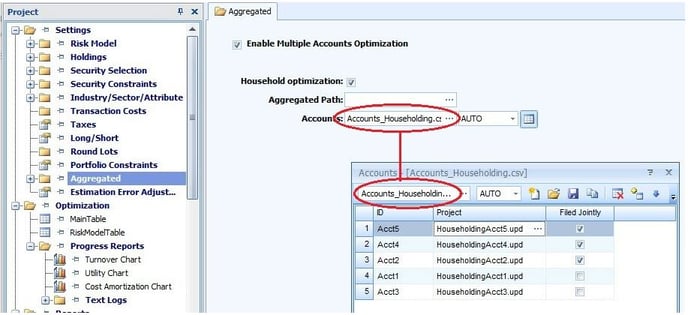
The required inputs are:
Aggregated Path - This is the default path to where the optimizer will look for the input files for the Aggregated Accounts being run.
Accounts - This is a 3-column file where the columns are:
- ID - this is the unique account ID.
- Project - this column points to a *.UPD file with the individual specifications for the account referenced in the 1st column. Project inputs are taken from the main project file, however, any input parameters for each account that will differ from the main project file should be defined in the *.UPD file. Parameters defined in the UPD override inputs in the main project file. If no parameter is specified in the UPD file then the input in the main project file will automatically be used.
- Filed Jointly - To indicated if this account is filed jointly in terms of tax implications then place a check in the box. If the box is unchecked then it is assumed the accounts are separate.
See Also: Aggregated Accounts
Last Updated: 10/26/2023