![Northfield_id_global.png]](https://learn.northinfo.com/hs-fs/hubfs/Northfield%20Logos%20and%20Brand%20Assets/Northfield_id_global.png?height=40&name=Northfield_id_global.png)
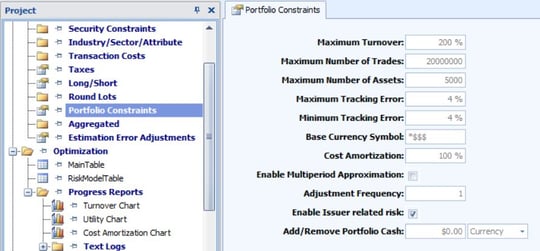
Adjustment Frequency - sets the number of iterations by which the Optimizer will automatically adjust the cost amortization parameter.
Enable Issuer related risk - When this box is unchecked it is assumed the stock specific risk is uncorrelated between securities. However, correlation of specific risks across two securities can occur when the two securities are related to the same firm. The EE and equity model exposure files contain an encrypted value with issuer information, so the correlation between the stock specific risk of securities from the same firm can be correctly accounted for.
Add/Remove Portfolio Cash - This feature allows changing the portfolio value by either withdrawing cash from the portfolio by selling some positions or investing more cash by adding it to the portfolio and then rebalancing. Please note that changing the portfolio value will not change or adjust any constraint or optimization settings. So, adding or removing cash from the portfolio may have an effect on various optimization settings since the initial positions will need to be scaled to reflect the new portfolio value. When the adding/removing of value is successful the new portfolio value will be reflected in both the initial and optimal portfolios and can be seen in all the reports. Should the addition/removal fail this will be reflected in the optimization messages.
See Also: Project Window
Last Updated: 10/25/2023